A free cover-image maker that starts from your title
Title Card makes blog cover images, YouTube thumbnails, Instagram posts, business cards and postcards right in your browser. No sign-up, no install, no watermark — and your images are drawn on your own device, never uploaded.
Open the tool →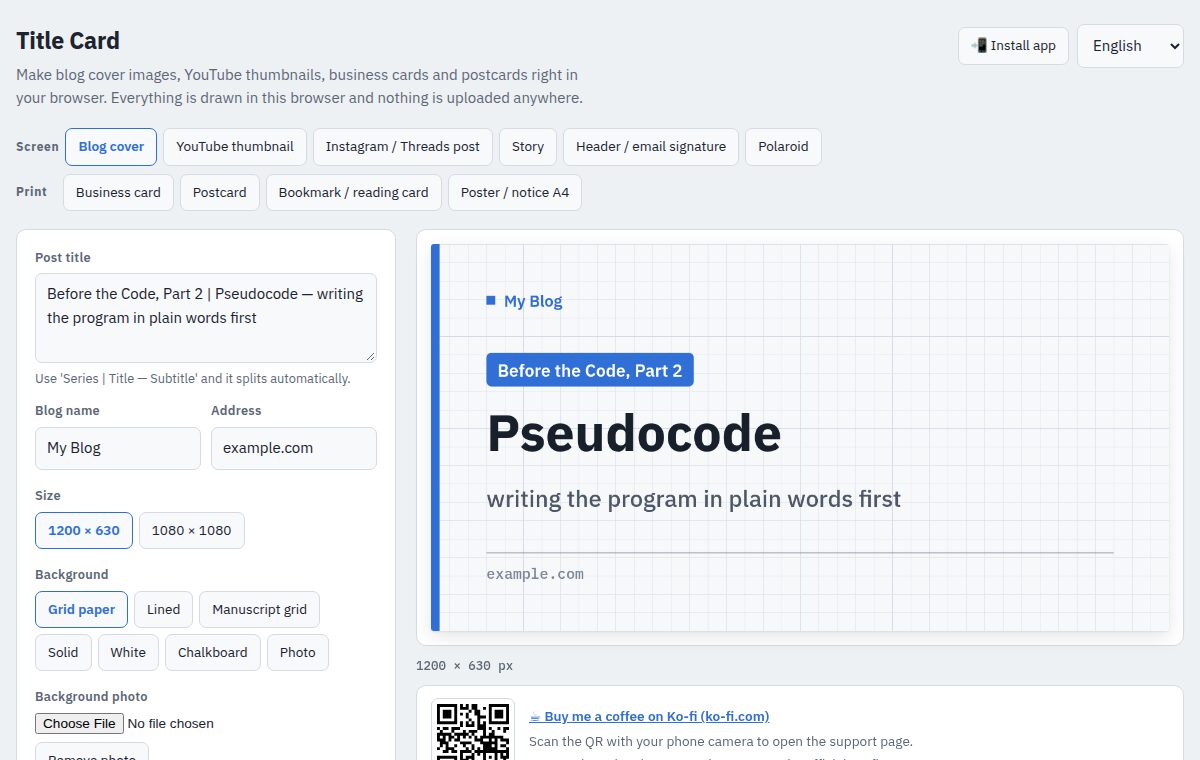
What you can make
- Blog cover images
- 1200×630 and 1080×1080. Write “Series | Title — Subtitle” and it splits the parts for you.
- YouTube thumbnails
- 1280×720 with big, readable text.
- Instagram / Threads posts and stories
- Square cards and vertical stories.
- Profile headers and email signatures
- 1500×500 header, 600×200 signature.
- Polaroid-style photos
- For screen, or print at Instax sizes.
- Business cards
- Front and back, with a QR code and phone / email icons.
- Postcards
- Photo front, address lines and stamp box on the back.
- Bookmarks, reading cards and A4 posters
- Print-ready PDF you can send to a print shop.
Why people use it
- Completely free — no account, no watermark
- Private by design: photos and text never leave your browser
- Print output at 300 dpi with bleed, gang-up sheets and crop-mark PDFs
- 20 built-in free photos (CC0)
- Grid, ruled, manuscript and chalkboard backgrounds; text outline and shadow; vertical text
- Interface in English, Korean, Japanese, Chinese, Spanish and Russian
- Installable as an app; works offline after the first visit
How it works
- Pick a format (blog, YouTube, business card …)
- Type your title and text, then choose background, colour and font
- Save as PNG or download a print PDF — or send it straight from the Share button
Questions
Is it really free?
Yes. No sign-up, no payment, and nothing is stamped on your image.
Where are my photos stored?
Nowhere. They are only used inside the browser on your device.
Can I use the images commercially?
Yes, what you make is yours. The built-in photos are all CC0.
Does it work on a phone?
Yes. Add it to your home screen to use it like an app.